How to Solve the File Outlook PST is Not an Outlook Data File?


If you are trying to open your Outlook data file and suddenly see the message “PST file is not an Outlook data file” I know it can feel stressful for anyone when your important emails are stored inside that file. Many users face this issue when importing backups, restoring old mailboxes and when moving data to a new system.
In most of the cases Microsoft Outlook shows this error when it cannot recognize or read the PST file structure properly but the good news is that this problem is very common and in many situations your emails are still recoverable. You just need to follow the correct approach instead of random trial methods.
I will explain to you in this guide why Outlook says a PST file is not an Outlook data file and how you can safely solve the error without risking your mailbox data.
Why Outlook Says PST File is Not an Outlook Data File?
When Outlook shows this error “the set of folders cannot be opened the file is not an outlook data file .pst” it simply means the PST file you are trying to open does not appear valid to the application. Also let me explain to you this does not always mean your file is useless or empty however in many cases the file still contains data but Outlook fails to read its structure.
You can check below the most common reasons behind this issue:-
- The PST file was corrupted due to an improper shutdown or crash.
- The export failed to complete or the download was interrupted.
- The file was manually renamed to .pst.
- The PST file suffered significant damage.
- The PST version is not supported or outdated.
- The file was damaged by a USB or cloud transfer.
If your PST contains important emails well in such case you should not try a random fix first as using the wrong method can make recovery difficult.
Common Error Messages
Many users think they are experiencing different problems but in reality most of these messages simply point to the same underlying issue.
You might see one of these following errors:
- Outlook says the PST file is not an Outlook data file.
- Microsoft Outlook cannot start, the file is not an Outlook data file (.pst).
- The set of folders cannot be opened, the file is not a .pst Outlook data file.
- The file archive.pst is not an Outlook data file.
- This is not an Outlook data file (.pst).
- The PST file is not an Outlook data file 2016/2019/365
All of these messages simply mean that Outlook cannot validate the PST file structure and the file may be corrupt or it is incomplete or created incorrectly.
When This Error Usually Appears
Based on recent testing and a user case I solved in January 2026 – This error often appears in the following situations:-
- After you copying a PST from an old computer
- After reinstalling Windows
- When you importing a backup PST
- When Outlook crashes
- When downloading a PST from cloud storage
- When opening an archived PST
- After exporting a large mailbox
In many of these cases I noticed that the file still contains emails but Outlook cannot open it normally.
How to Fix “PST File is Not an Outlook Data File”
I cannot start Microsoft Outlook the file is not an outlook data file .pst. In order to resolve this error, we have mentioned some manual and automated techniques that can help to fix this issue efficiently. You can try these safe and updated methods:-
1. Verify the PST File Source
You need to make sure:-
- File is not 0 KB
- Properly downloaded or copied
- Not renamed manually
If the file size looks incorrect you need to re-copy from the original location.
2. Open PST Using Import Instead of Open
Sometimes Outlook fails to open PST directly but yes it works through import. Check below and follow all these steps:-
- Open Outlook
- Go to File → Open & Export
- Choose Import/Export
- Select Import from another program or file
- Choose Outlook Data File (.pst)
This works when the PST structure is slightly unstable.
3. Create New Outlook Profile
A corrupted Outlook profile may also trigger this error so creating a new Outlook profile is the ideal solution check below how you can do this:
- Open Control Panel → Mail
- Click Show Profiles
- Add new profile
- Configure account
- Try opening PST again
4. Use ScanPST Tool
You can use the ScanPST tool but you need to remember that Microsoft Inbox Repair Tool can repair minor PST issues only.
- Locate ScanPST.exe
- Browse PST file
- Start scan
- Repair if errors found
Also it is important to know that If your PST is heavily corrupted well this method may not work.
Limitations Of Manual Methods
- Sacnpst.exe only repair the minor corruption issues.
- Probability of data loss while repairing the data files.
- Cannot repair the over-sized files.
- Only repairs the header part of file.
What to do If Manual Approaches Fails?
If the it is severely or highly damaged then you can’t fix this error. Hence to overcome the limitations of the manual method, we come up with the best alternative .i.e PST Repair Tool.
This automated tool is well capable to repair both the minor and major corruption issues in Outlook. This professional tool provides an advanced scanning option to repair an extremely corrupt file.
Moreover, the software retains the original hierarchy of emails and preview email attachments before performing recovery.
- Recover PST files in bulk without resulting any kind of data loss.
- Provides quick and advanced scanning mode.
- Decrypt SMIME and OpenPGP encryptions
- Retains metadata of original PST
- Provide 8 different options to preview emails
You need to download, install and run this proficient software. Now, follow the steps to repair file and fix archive.pst is not an Outlook file error:

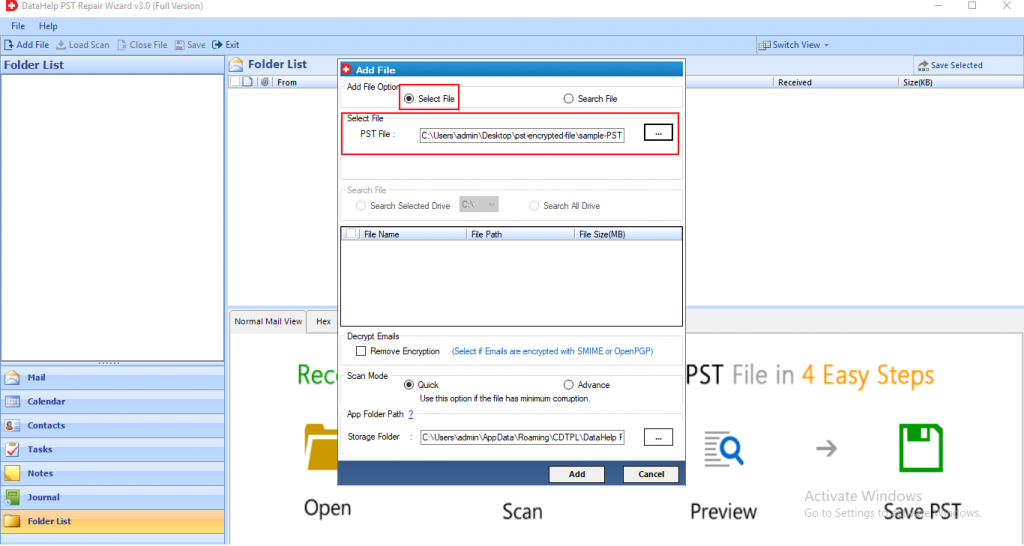
Step 1: Click on the Add File button to insert the corrupted PST files.
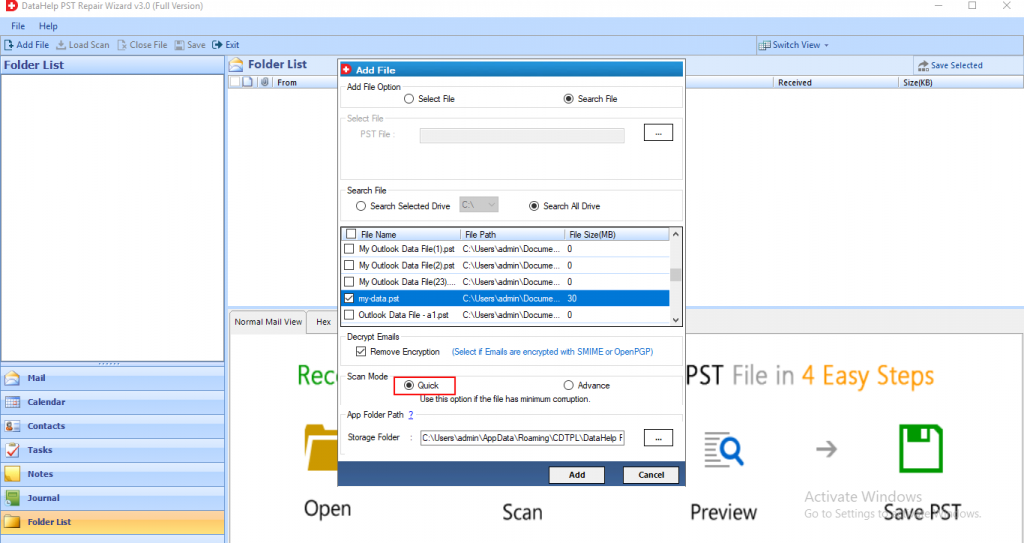
Step 2: After adding the files, select the Quick or Advanced Scan option. Choose as per need.
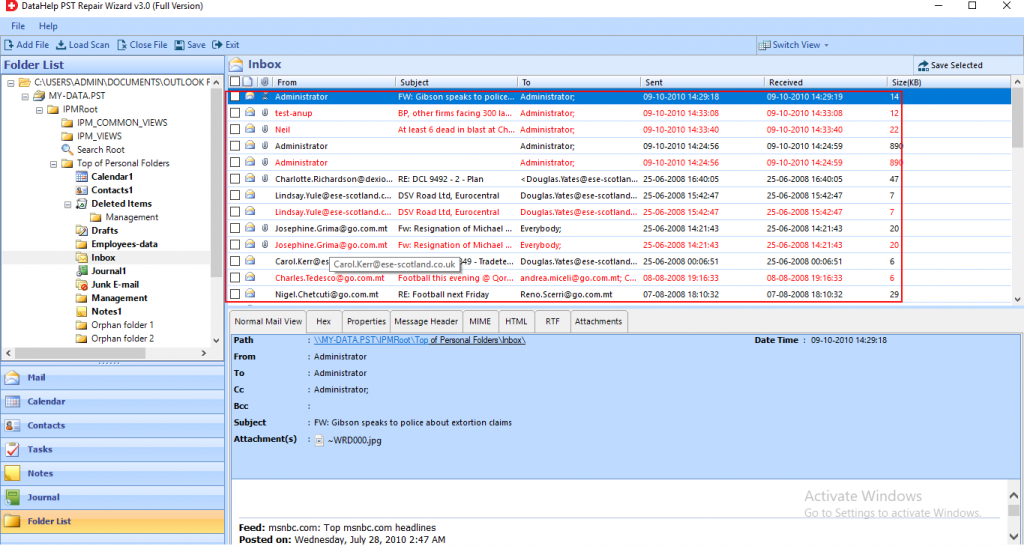
Step 3: Now, the scanning process gets started. Preview all the contacts, notes, tasks, journals, folder list, calendars highlighted in red color at the left panel of the software.
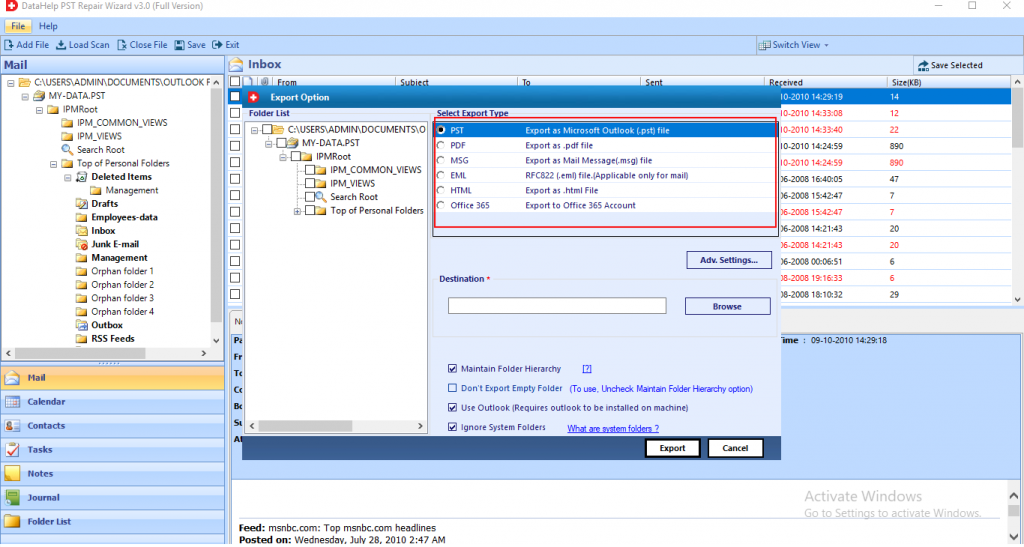
Step 4: Now, select the destination location where you want to save the Output file. Click on the Export button.
Step 5: Finally, the tool repaired all the corrupted data. Hit the OK button.
Quick Questions Users Ask
Q1. Is PST permanently damaged after this error?
No not always as many PST files remain recoverable if you handle everything properly.
Q2. Can I fix this error without losing emails?
Yes absolutely if you use the correct repair or recovery method early you can definitely fix this error easily.
Q3. Why does Outlook reject a valid PST file?
This is usually happens due to corruption, incomplete transfer or structural damage.
Final Words
Seeing the message “PST file is not an Outlook data file” can be worrying when your emails are very important for you. But this error does not always mean any permanent data loss but in many situations the PST file still contains recoverable mailbox data.
It is important for you to stay calm, avoid risky tactics and yes adopt a structured approach to fix this. Once you understand why Outlook displays this error and apply the correct solution – regaining access to your email becomes much easier and safer.