How to Analyze CSV Files with ChatGPT (And Where It Fails)


Can ChatGPT analyze CSV files? Yes but the answer isn’t as straightforward as it seems. ChatGPT can read CSV files, identify trends, summarize data, answer questions, generate charts and even help you to clean your important datasets. However the quality of the analysis depends on factors like your dataset, the prompts you use and whether you are using the free or paid version ChatGPT for Advanced Data Analysis.
There are a huge number of professionals, students, marketers and business owners who use AI for day to day tasks. Analyzing CSV files using ChatGPT has now become one of the fastest ways to explore structured data without writing any complex formulas or code. So instead of manually filtering rows in Excel you can simply upload your CSV file and ask ChatGPT questions to uncover insights within minutes.
It is said that ChatGPT is not perfect as large datasets, duplicate records, inconsistent formatting or missing values can simply affect data quality. Understanding these issues is just as important as knowing how to upload files.
In this guide you will learn how to analyze CSV files in ChatGPT, understand the strengths and ChatGPT analyze CSV limits, compare it with Excel, find best prompts to perform the task and also learn when AI is the right choice and when you need a dedicated CSV tools.
Expert Tip
Think of ChatGPT as an intelligent data analyst rather than a calculator that never makes mistakes and in some cases ChatGPT can indeed make errors. The more organized the data in your CSS file and the more specific your prompts are well the better your results will be.
Table of Contents:
- Can ChatGPT Analyze CSV Files? (Quick Answer)
- It may not be the best choice for:
- How ChatGPT Understands CSV Data
- ChatGPT Free vs Advanced Data Analysis: What’s the Difference?
- How to Analyze CSV Files in ChatGPT?
- ChatGPT Prompts for CSV Analysis
- ChatGPT vs Excel for CSV Analysis
- Clean Your CSV File Before AI Analysis
- Conclusion
- Frequently Asked Questions
Can ChatGPT Analyze CSV Files? (Quick Answer)
Yes. ChatGPT can analyze CSV files and help you identify trends, summarize data, answer questions, generate charts, perform basic to advanced analysis and much more all depends on your prompt. If you are using ChatGPT Advanced Data Analysis then it can process your CSV files with Python also to deliver more accurate calculations and visualizations.
For most everyday datasets analyze CSV with ChatGPT is a fast and convenient option nowadays. However the quality of the results depends on your data, prompts you provide and how well your CSV file is organized. For large or complex datasets you should always review the output before making important decisions.
ChatGPT is a good choice for:
- Exploring trends and patterns in structured datasets.
- Summarizing any large tables into readable insights.
- If you need to find correlations and unusual values.
- When you need to create quick charts and visual reports.
- If you need explanation statistical results in simple language.
- Writing Python code for deeper data manipulation with ChatGPT prompts.
It may not be the best choice for:
- Extremely large CSV files.
- Highly regulated or if you have confidential business data.
- Mission critical financial or scientific analysis without human verification.
- And advanced predictive modeling that needs analytics software.
⚠ Reality Check
ChatGPT can explain your given data intelligently but also it does not automatically know your business context. So you need to always verify your important conclusions before making strategic or any financial decisions.
How ChatGPT Understands CSV Data
ChatGPT can interpret CSV files by looking at their columns, values and overall structure of your file and then using that given information to answer your questions. With Advanced Data Analysis ChatGPT can also use Python to perform calculations, clean data and create charts. Check below and understand with some practical examples.
Instead of building formulas manually here you can simply ask GhatGPT:
“Which product category generated the highest revenue?”
or
“Find the most common customer complaints by region.”
Based on your given request ChatGPT can easily calculate averages, compare categories, identify trends and summarize results and also create ChatGPT data visualization like charts or graphs. This makes ChatGPT CSV file analysis absolutely useful for quickly exploring a dataset without writing code.
However the results still depend on the quality of your CSV file. Duplicate rows, missing values, inconsistent dates or if there are any poorly structured columns it can affect analysis. Cleaning the dataset first can help produce more reliable results.
ChatGPT Free vs Advanced Data Analysis: What’s the Difference?
ChatGPT can work with your given CSV files but its capabilities completely vary by plan and available features. If you are using a free version then let me tell you it is suitable for basic questions, simple file analysis and smaller datasets only. ChatGPT Advanced Data Analysis CSV capabilities are better suited for calculations, data cleaning, visualizations and more complex analysis.
| Feature | Free ChatGPT | Advanced Data Analysis |
|---|---|---|
| Basic CSV analysis | ✔ | ✔ |
| File uploads | Limited | ✔ |
| Large dataset analysis | Limited | Better suited |
| Python/code execution | Limited/Unavailable | ✔ |
| Charts and visualizations | Limited | ✔ |
| Advanced calculations | Limited | ✔ |
| Data cleaning | Basic | More advanced |
If you only need to understand a small CSV or answer basic questions then the free version is enough for you. But for complex ChatGPT CSV file analysis, larger datasets, ChatGPT data visualization or automated calculations you need an advanced or paid version.
You can simply start with a small and clean dataset. If your analysis needs repeated calculations, charts or data manipulation then you should switch to an advanced version.
How to Analyze CSV Files in ChatGPT?
Once your CSV file is ready now the process is fairly simple. The important part is not just uploading your file but telling ChatGPT exactly what you want to learn from it.
Step 1: Upload Your CSV File
Open ChatGPT and start a new conversation. Now just upload your CSV file using the file attachment option and wait for it to finish processing.
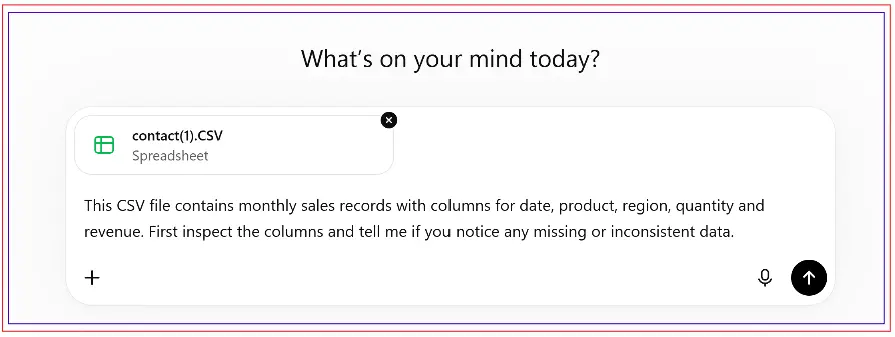
If you think your file contains any kind of sensitive information then you must review your data before uploading it. Remove unnecessary personal details, passwords, account numbers or other confidential information that is not required for your analysis.
Step 2: Tell ChatGPT What the Data Contains
Do not immediately ask for a complete analysis however you should first give ChatGPT some context about your dataset.
For example:
“This CSV file contains monthly sales records with columns for date, product, region, quantity and revenue. First inspect the columns and tell me if you notice any missing or inconsistent data.”
This prompt gives ChatGPT an opportunity to understand your csv file structure before you start asking business questions.
Step 3: Ask Focused Questions
Once your file has been inspected now you can ask specific questions rather than using one broad instruction.
- Which five products generated the highest revenue?
- Compare monthly sales and identify the months with unusual changes.
- Show the average order value by region.
This approach makes data manipulation with ChatGPT prompts easier to control and helps you easily understand exactly how each result was produced.
ChatGPT Prompts for CSV Analysis
A good ChatGPT prompt for CSV analysis should simply explain the task, identify the relevant columns and mention how you want the result. You must avoid giving complicated and technical instructions to ChatGPT.
For example – instead of writing this one line prompt:
“Analyze this CSV.”
You should try prompt like this:
“Analyze the given file for the revenue column by month. Identify the three strongest and weakest months, calculate the percentage change and also explain the main pattern in simple language.”
For data cleaning you could ask ChatGPT:
“Check this CSV file for missing values, duplicate records, inconsistent dates and unusual values. List the issues before making any changes.”
Now for visualization:
“Create a chart that shows monthly revenue and highlight any significant changes.”
The more specific the request the easier it is to evaluate whether the response actually answers your question.
Important
You should never assume a confident looking answer is automatically correct. For important calculations you can ask ChatGPT to show the calculation method and then verify the result independently.
ChatGPT vs Excel for CSV Analysis
ChatGPT and Excel both work well for CSV analysis but in different ways. Excel is better for formulas, filters, PivotTables and for detailed spreadsheet work. ChatGPT is useful when you want quick answers, summaries, trends or explanations without creating formulas yourself.
- For example: you can use ChatGPT to identify sales trends and then use Excel to verify the numbers or create a final report.
- Best approach: Use ChatGPT for quick analysis and insights also Excel when you need detailed control over your data.
Clean Your CSV File Before AI Analysis
The quality of your analysis starts with the quality of your CSV file means how clean it is. Even a powerful AI tool can produce confusing results when your source data contains duplicate rows, missing values, inconsistent formats or any unnecessary columns.
So before uploading a dataset you should check for duplicate records, blank fields, inconsistent date formats, different spellings, incorrect delimiters and any unusual characters. If your CSV contains many duplicate records well then a dedicated tool such as DataHelp CSV Duplicate Remover can help you quickly clean your file before AI analysis.
🔎Related Guide: If you are working with large CSV files which containing duplicate records? See Find and Remove Duplicates in Large CSV Files for practical ways to prepare your dataset before AI analysis.
A cleaner CSV file gives ChatGPT a better starting point and makes it easier to determine whether an unexpected result comes from the data or the analysis.
Conclusion
Can ChatGPT Analyze CSV Files? Yes it can be a useful way for you to explore, summarize, and understand structured data. However the results completely depend on clean data, clear prompts and proper verification. You can use ChatGPT for quick insights and ChatGPT CSV file analysis but I would also say don’t rely on it blindly. Understanding ChatGPT to analyze CSV limits will help you get more reliable results.
Frequently Asked Questions
Q1. Can ChatGPT Analyze CSV Files Without Coding?
Yes. You can upload a CSV and ask questions without writing Python or formulas. ChatGPT can easily summarize your data, identify patterns and explain the results based on your prompts.
Q2. Can ChatGPT Analyze Large CSV Files?
It depends on how complex your data is and whether the CSV file is clean or not and generally it struggles with large CSV files. If you have very large csv files the splitting or cleaning data first may give better results.
Q3. How Accurate Is ChatGPT for CSV Analysis?
ChatGPT can provide you very useful analysis but yes it is not guaranteed to be error-free. You should always verify your important calculations particularly when the results will affect any operational decisions.
Q4. Should I Clean a CSV Before Uploading It to ChatGPT?
Yes. Removing duplicates and handling missing data will make the analysis more reliable as clean input generally makes it easier for ChatGPT to identify meaningful patterns.