How Do I Find and Remove Duplicates in Large CSV Files?


How to Find and Remove Duplicates in a CSV File? We will start from everything you need to know from finding duplicate rows to cleaning up your CSV file using the smartest features available.
CSV files are one of the most common ways to store and exchange your data. Whether you are storing customer records, email lists, sales reports, product information or sales data a CSV files make data handling very easy and simple. But duplicate entries can quickly become a serious problem.
A CSV file with duplicate records can lead to inaccurate reporting, duplicate email campaigns, data inconsistencies and completely wasted of storage space. But no worries, in this guide we will learn how to find and remove duplicate entries from large csv files. We will know why they happen and fix them with manual and professional solutions to easily remove duplicates from csv files.
Table of Contents:
- What Are Duplicate Rows in a CSV File?
- Why Do Duplicates Appear in CSV Files?
- Why You Must Remove CSV Duplicates
- How to Find Duplicates in a CSV File
- Method 1: Using Microsoft Excel or Google Sheets
- How to Remove Duplicates from a CSV File
- Removing Duplicates in Excel – Built in Feature
- Removing Duplicates Using Python (Pandas)
- The Easiest Way Using DataHelp CSV Duplicate Remover
- Frequently Asked Questions
- Wrapping It Up
What Are Duplicate Rows in a CSV File?
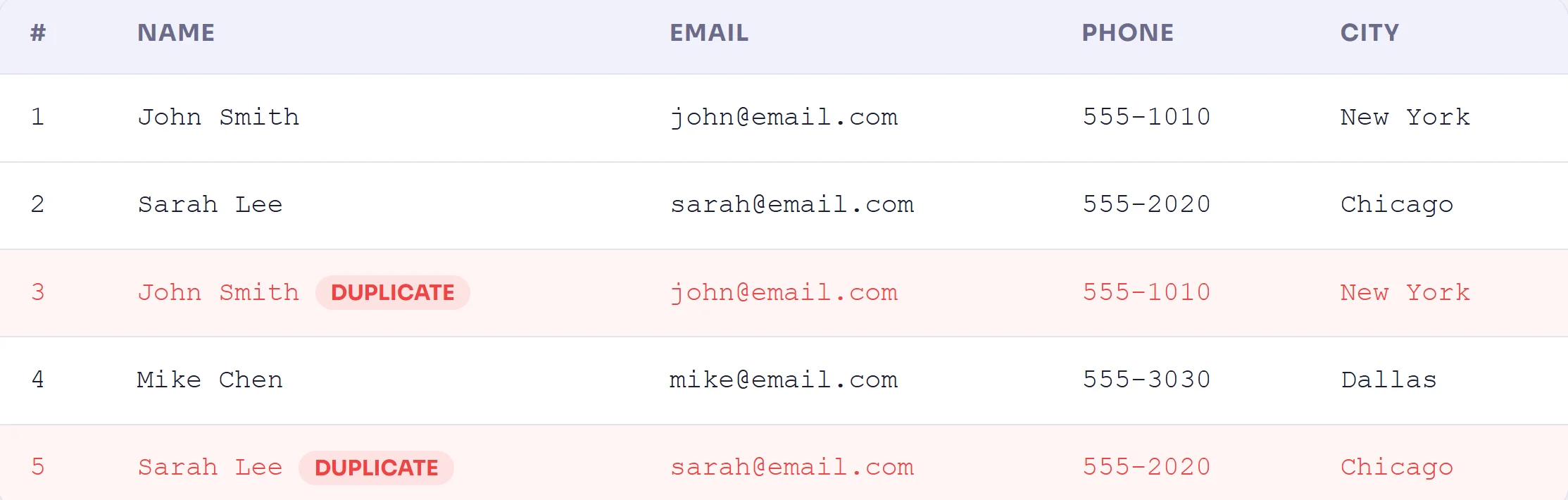
A duplicate row is any row in your CSV file where the same data appears more than once and it can be an exact copy of another row or it can be a partial match where a specific column (like Email or Order ID) repeats. Here’s a quick example you can check below. Take a look at this CSV data:
In this you can clearly see Rows 3 and 5 are exact duplicates of rows 1 and 2. They look harmless in a small file like this but can you imagine if this is happening across 50,000 rows. That’s when actual problems start.
Find and Remove Duplicates in a CSV File
There are two types of duplicates you’ll typically encounter:
- Exact duplicates: Every column in the row that simply matches with another row completely.
- Partial duplicates: Only a few important fields (such as Email ID, Phone, Order ID) are repeated in the .csv file.
Why Do Duplicates Appear in CSV Files?
Before you move to fix this problem it is important to know where duplicates appear in a CSV file as understanding this will help to know where it’s coming from. Here are the most common reasons your CSV file ends up with duplicate rows:
- Data Imported Multiple Times: You exported data from a CRM, database, or app and inadvertently you did it twice. Now both exports have merged into a single CSV file and suddenly everything in your CSV has been duplicated.
- Copy Paste Errors: When multiple team members work on the same spreadsheet or CSV manually then it is very easy to accidentally paste data that’s already there.
- Merging Multiple Data Sources: You combined customer data from your website, your app and from your email platform. Users who exist in all three places now show up three times in your CSV.
- Form Submissions / Double Clicks: Online forms can capture duplicate entries when someone submits a form twice or when confirmation emails loop back into your system.
Why You Must Remove CSV Duplicates
You might think it’s just a few extra rows but do you know how bad it can be? Honestly telling you it is very bad. Here’s what duplicates silently do to your data:
Duplicate data is not just annoying – it’s dangerous for your business
Sending the same email to a customer twice, inflating sales reports, overcharging clients or misreporting analytics well all of these can be traced back to unclean CSV data.
- Email campaigns: Your subscribers get the same email twice that hurts your sender reputation and annoys your audience.
- Reports and analytics: Your dashboards show big numbers that will surely lead to wrong business decisions.
- Billing errors: A customer gets charged twice because their order appears twice in your system.
- Database imports: The import fails or throws errors because your primary keys are repeated.
- Wasted storage and processing time: You are storing and processing data you don’t need.
How to Find Duplicates in a CSV File
Before you remove duplicates first you need to spot the duplicate rows and columns or any other duplicate entries in your CSV file. Here are the most practical ways which you can use to find duplicate entries in your CSV file.
Method 1: Using Microsoft Excel or Google Sheets
If you are comfortable with spreadsheets then Excel is a solid starting point. Here’s how to check for duplicates in a CSV using Excel’s Conditional Formatting:
- Open Your CSV in Excel: And simply Go to File → Open and select your .csv file. Here Excel will load it as a spreadsheet.
- Select the Column You Want to Check: Click the column header (like Email or Order ID) to highlight the entire column.
- Apply Conditional Formatting: Go to Home → Conditional Formatting → Highlight Cell Rules → Duplicate Values. Excel will highlight every duplicate in a color you choose.
- Use a COUNTIF Formula: In an empty column you can enter: =COUNTIF($A:$A, A2)>1 – this returns TRUE for every value that appears more than once.
How to Remove Duplicates from a CSV File
Have you found duplicate entries in a CSV file? Well that’s great. Now let’s remove them safely. You have three main options depending on your skill level and file size.
Removing Duplicates in Excel – Built in Feature
Excel has a direct “Remove Duplicates” button that works well and if you have a smaller set of CSV files you can use them and utilize accordingly:
- Select Your Data Range: Click anywhere inside your data table and you can also select the entire sheet with (Ctrl+A).
- Go to Data → Remove Duplicates: In the ribbon you need to click the Data tab and simply select Remove Duplicates from the Data Tools section.
- Choose Which Columns to Check: A dialog box appears you need to check the columns you want Excel to compare. Check all columns for exact duplicates or just one column (like Email) for partial duplicates.
- Click OK and Save as CSV: Excel removes the duplicates and tells you how many rows were deleted. Then go to File → Save As and save it back as a .csv file.
Reading Suggestion: You can also read how to Fix We Found a Problem With Some Content in Excel Error and fix is safely.
Removing Duplicates Using Python (Pandas)
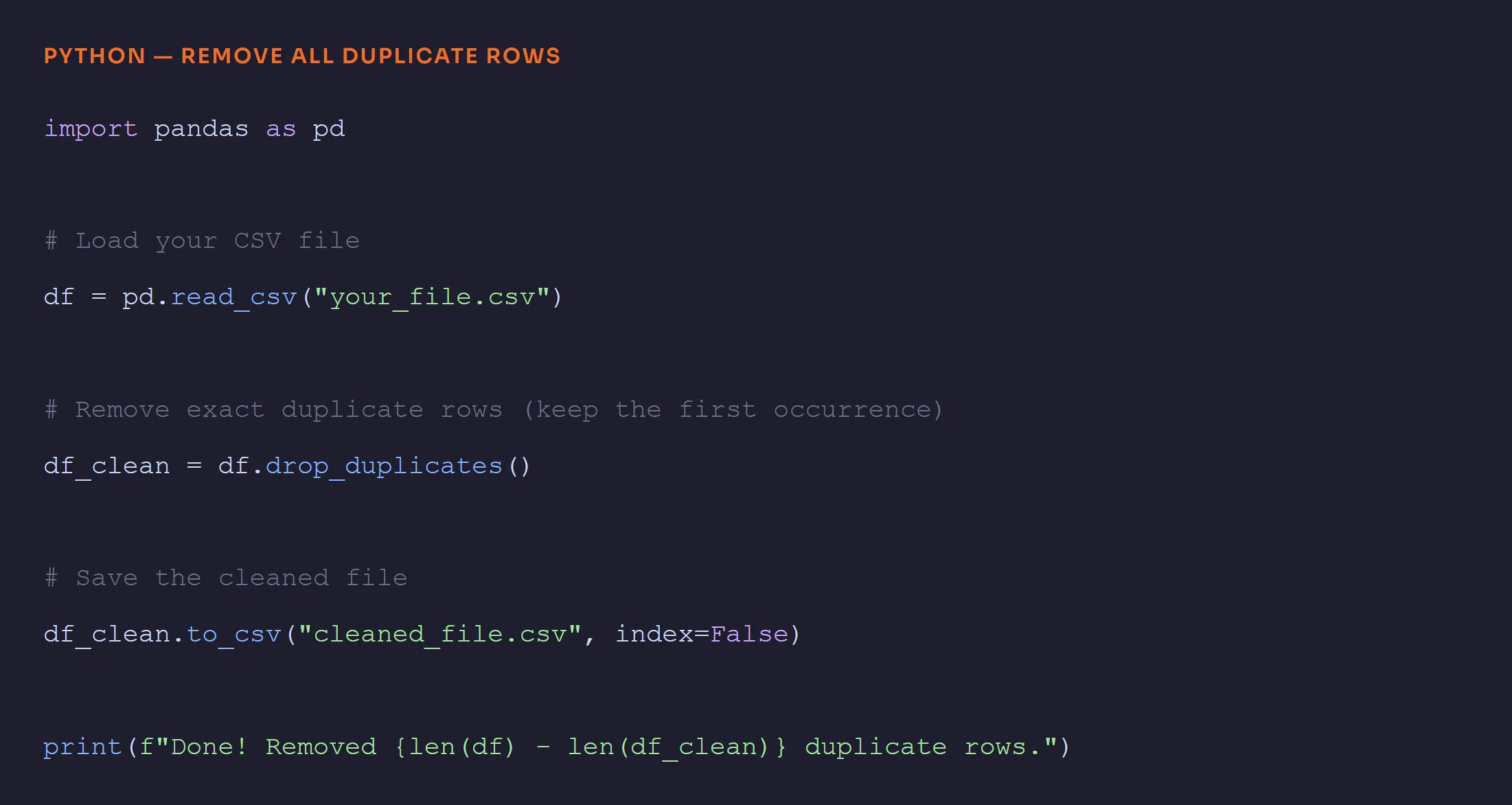
If you are dealing with large CSV files or you want an automated solution then Python with the Pandas library is the right and powerful option. Here you can find the simplest code to remove duplicate rows from a CSV file:
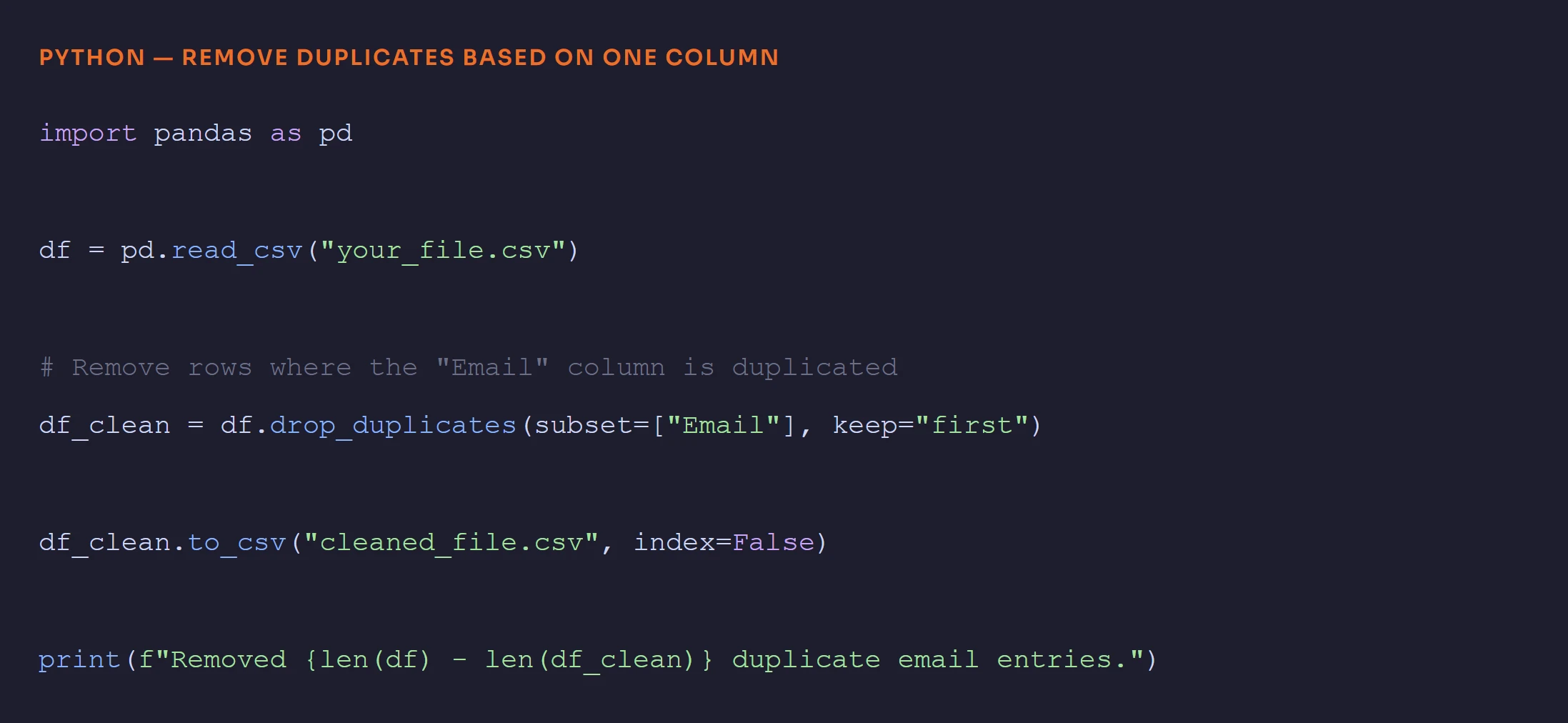
If you want to remove duplicates based on a specific column (like Email only) then you can simply use this:
Python Requires Technical Knowledge
You need Python installed, the Pandas library installed and you need to be comfortable with writing and working with code. If you are not a developer then this process takes a learning curve. A small typo can break the script or corrupt your file.
The Easiest Way Using DataHelp CSV Duplicate Remover
Now let’s be very honest, not everyone wants to write Python code or wrestle with Excel formulas. If you just want to upload your CSV file, remove duplicates and download a clean file in under a minute that’s exactly what DataHelp CSV Duplicate Remover is built for. You can download and install this tool to get what you want in an efficient manner. Software work for both Windows and Mac OS systems.
DataHelp CSV Duplicate Remover works completely offline on your computer so your data never leaves your machine ever. It’s fast and designed to solve real CSV duplicate data cleanup.
Frequently Asked Questions
Q1. Can I find duplicates in a large CSV file without Excel?
Absolutely you can find as Excel has a row limit of about 1 million rows so if you have large CSV files then you will need either Python (Pandas) or a dedicated tool like DataHelp CSV Duplicate Remover.
Q2. Is it safe to use an online CSV duplicate remover tool?
No it’s not recommended as most of the online tools available are not secure and you have to compromise with your CSV data.
Q3. Does removing duplicates delete important data?
Not at all if you did it correctly. When you remove duplicates you simply keep one copy (usually the first occurrence) and remove the rest.
Q4. What is the fastest way to remove duplicates from a CSV file?
The fastest no code method is using DataHelp CSV Duplicate Remover Software. It processes even large CSV files in seconds and allows you to deduplicate csv files.
Wrapping It Up
Duplicate rows in a CSV file is a hidden problem that grows into a major headache. Whether your file has 100 rows or 10 million rows simply Find and Remove Duplicates in a CSV File is important to keep data clean and the fix is the same find them, remove them and put a process in place to stop them from coming back.