How to Recover Deleted Emails from Outlook After 30 Days?


I know losing your important emails can be stressful for you especially when the 30 days recovery window has already passed. Now like you many other users believe that once emails are permanently deleted from Outlook after 30 days well they are gone forever. However this is not always true. In many practical scenarios recovery is still possible if you are using the right method and correct timing. If you are looking for professional help on how to recover deleted emails from Outlook after 30 days.
Well I have explained in this guide every possible and practical solution based on my 14 years of experience handling Outlook problems with real recovery cases, Outlook behavior, and professional data recovery experience.
Whether you are a business user, student or a working professional this article will help you understand what is actually recoverable and how to retrieve your lost emails safely.
Table Of Content
- Recovery Possibility
- When Outlook Emails Suddenly Disappear
- How Outlook Email Deletion Actually Works
- Can You Recover Deleted Emails After 30 Days?
- Methods to Recover Deleted Emails After 30 Days
- When Manual Methods Fail
- Things to Keep in Mind Before Recovery
- Professional Outlook Email Recovery Solution
- Case Study
- Frequently Asked Questions
- Final Verdict
Recovery Possibility
| Situation | Recovery Chance |
|---|---|
| Deleted within 30 days | Very High |
| After 30 days with backup | High |
| After 30 days without backup | Medium |
| Hard deleted long ago | Low |
| PST corrupted | Recoverable via tool |
When Important Outlook Emails Suddenly Disappear
Most of the users land here after they are facing one of these situations you can check below:-
- Important emails accidentally deleted
- Deleted Items folder emptied
- “Recover Deleted Items” folder also empty
- More than 30 days passed
- Outlook showing no recovery option
When a user accidentally deletes important emails he generally panics and start searching the internet like:
- how to recover permanently deleted emails from outlook after 30 days
- can you recover deleted emails from outlook after 30 days
- how can i recover permanently deleted emails from outlook after 30 days
Now the biggest concern is not just losing emails but it is losing their attachments, legal communication, invoices or client conversations stored inside them.
Well if this happens you don’t need to worry at all as the good news is recovery may still be possible but it is depending on how the emails were deleted and where Outlook stored them.
How Outlook Email Deletion Works (Before & After 30 Days)
To understand recovery you must first need to understand how Outlook deletes your emails. When you delete an email in Outlook (including Microsoft Outlook) well it doesn’t vanish immediately. Instead it goes through several stages which you can check below all 4 stages of email deletion.
Understanding Email Deletion Stages in Outlook
Stage 1:- (Inbox → Deleted Items) So when you delete your email normally it simply moves to Deleted Items.
Stage 2:- (Deleted Items → Recoverable Items) When you empty Deleted Items the Outlook moves emails to the hidden Recoverable Items folder.
Stage 3:- (Permanent Deletion) After the retention time it is (usually 14 to 30 days) all emails are permanently deleted from the server view.
Stage 4:- (Backup or Data File Storage) So even after permanent email deletion the emails may still exist in the following:
- PST backup files
- OST cache files
- Server backups
- Archive folders
This is one of the major reasons why recovery after 30 days is sometimes still possible.
Do you know?
In many cases the permanently deleted emails can still be recovered from PST backups or exported Outlook data files. If you have a PST file but you can not find your emails just follow this guide on How to Recover Deleted Emails from PST File – Straightforward Solution to restore them safely.
Can You Recover Deleted Emails from Outlook After 30 Days?
Well this is one of the most important questions if the recovery is still possible or not after 30 days of deleting emails so now let me be very honest and answer you frankly – Recovery is Possible If is meets the following conditions:-
- If backup exists (PST, system, server)
- Exchange/Microsoft 365 retention enabled
- Outlook data file still contains emails
- Archive or local cache exists
- Emails stored offline earlier
And recovery is Difficult If:-
- Hard deleted long ago
- No backup exists
- PST overwritten
- Retention expired
- Account resynced multiple times
Manual Methods to Recover Deleted Emails After 30 Days
I am telling you 5 proven methods which I have used myself in such a situation and recovered the deleted emails successfully. You can also use them in the right way and recover your deleted emails successfully.
Method 1: Check Recoverable Items Folder
This method is still quite successful and can be used even after 30 days, although some enterprise or Microsoft 365 accounts have longer retention times. Here are the steps you will need to take:
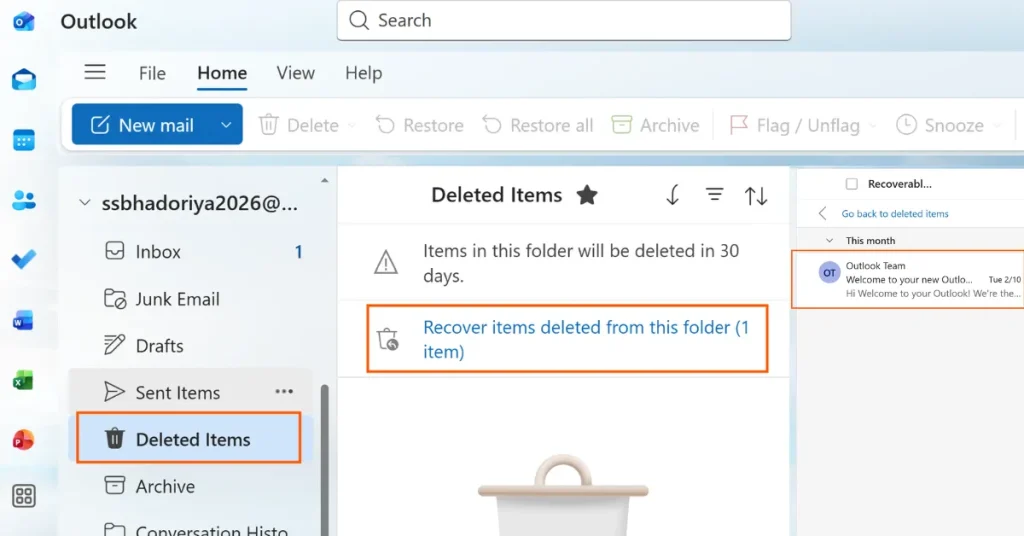
- Open Outlook
- Go to the Deleted Items
- Now click Recover items deleted from this folder
- And restore available emails
If you see emails appearing here well you can instantly recover your email but if nothing appears here then you continue with the next methods.
Method 2: Check Archive and Other Outlook Folders
Many users assume that emails are permanently deleted when in fact they have been deleted as per the rules.
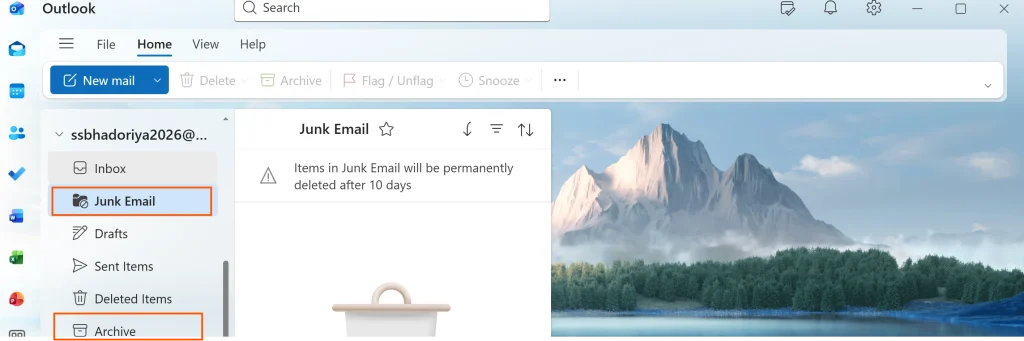
You can check the following:
- Archive folder
- Spam/Junk folder
- Focused inbox
- Custom folders
- Search entire mailbox
This simple step solved your recovery in many real cases.
Method 3: Recover Emails from Backup
This is the most effective method If you are wondering how can i recover permanently deleted emails from Outlook after 30 days because backup is your best option.
You check for these Backups:-
- Old PST files
- Windows backup
- OneDrive backup
- External drive backup
- Company server backup
Restore from PST:-
- Open Outlook
- Go to File → Open & Export
- Open Outlook Data File
- Browse PST backup
- And import emails
If you find that backup is still exists well your recovery success is very high.
Method 4: Recover from Outlook Data Files (PST/OST)
Even after your email deletion you can still find emails inside Outlook data files check below how.
PST Recovery if PST is not overwritten:-
- Open PST in Outlook
- Search for emails
- Export them safely
OST Recovery If account is removed but OST remains:-
- Cached emails may still exist
- Can be recovered using professional methods
This is one of the most overlooked recovery methods.
Method 5: Admin Recovery for Microsoft 365
This method is for the office users and If you’re using company email so admin can recover emails using:-
- Exchange admin center
- eDiscovery
- Retention policy
- Backup server
This is especially useful for:-
- corporate users
- legal teams
- enterprise accounts
Many users are searching how can i recover permanently deleted emails in outlook 2019 or enterprise Outlook recover emails through admin assistance.
What to Do When Manual Methods Fail?
Is recovery possible even if the manual method fails? If so, how? This is a user’s question so let me tell you that there are several reasons why manual methods fail.
- No backup exists
- Emails hard deleted long ago
- PST corrupted
- Account reconfigured multiple times
At this stage when manual methods fail yes recovery becomes technical but don’t panic recovery may still be possible using a secure and automated way.
Things to Keep in Mind Before Trying Recovery
| Do NOT Do This | Do This Instead |
|---|---|
| Create new PST files repeatedly | Stop heavy Outlook activity immediately |
| Sync Outlook account again and again | Check all available backups first |
| Do not overwrite existing backup files | Export recovered emails safely to new location |
| Use random free online tools | Use trusted and secure recovery methods |
| Ignore backup folders or archives | Review AutoArchive and local PST locations |
Professional Outlook Email Recovery Solution
When all manual recovery methods fail and Outlook no longer shows you any restore option then the issue lies within the Outlook data file (PST). Even after emails are permanently deleted well the traces of mailbox data usually remain inside the PST file but it cannot be accessed manually.
So In such cases using a professional PST repair and recovery solution is the most practical and safe approach. A reliable tool like DataHelp PST Repair Tool can deeply scan your damaged/inaccessible PST files and recover permanently deleted emails, attachments and mailbox items even after long periods.
Case Study
A finance professional accidentally deleted an entire project mailbox and deleted items cleared 30+ days passed. No emails visible in Outlook.
We checked system backup and found an old PST file that was corrupted but after using recovery methods over 3,800 emails with attachments were restored successfully. This shows recovery is still possible even after 30 days everything is handled correctly.
Frequently Asked Questions
Q1. Can you recover deleted emails from Outlook after 30 days?
Yes you can recover if backup, archive or data file still exists also recovery depends on storage and deletion type.
Q2. How to recover your permanently deleted emails from Outlook after 30 days?
You need to check backup PST files and server retention, archive folders or by using a professional recovery solution.
Q3. Are deleted Outlook emails gone forever?
No – not always as many emails remain in data files or backups even after permanent deletion and yes recovery is possible but using the correct approach.
Q4. How long does Outlook keep deleted emails?
Well Outlook usually keeps 14 to 30 days in recoverable Items but the retention varies by account type.
Q5. Can Outlook admin recover old emails?
Yes for sure enterprise admins can recover emails using server retention or backup.
Final Verdict
Searching for how to recover deleted emails from Outlook after 30 days usually means that important emails are already missing and panic sets in. But in many cases a recovery is still possible if you take the right steps at the right time this is what matters a lot.
The key steps are:-
- Check recoverable folders
- Look for backups
- Open PST/OST files
- Use professional recovery if needed
Even if your emails are permanently deleted they may still be present in a backup of Outlook data files and with the right approach many users have successfully recovered their emails even after 30 days.
Just follow the most important rule – Act carefully and avoid overwriting potential recovery sources.