DataHelp Outlook PST Repair Software is a powerful solution to repair corrupt, damaged or inaccessible Outlook PST files and recover Emails, Contacts, Attachments and Mailbox Data Safely.
Free Live Demo - Trusted by IT Professionals Worldwide, DataHelp MBOX to Outlook Converter Fully Secured Download Version

Virus Total Safe
Download with Confidence: Certified Clean by 70+ Antivirus Engines
What Data Can Be Recovered from Corrupt PST Files

Emails, Attachments

Recover Outlook emails with attachments such as documents, images and embedded files without losing any data integrity.
Contacts, Address
Restore all your Outlook contacts including names, phone numbers, email addresses and contact details.
Calendars and Tasks
Easily recover Outlook calendar entries, meeting schedules, reminders and all task items from your corrupt PST files.
Notes, Entries
PST File Repair Tool allows you to retrieve Outlook notes, journal records and additional mailbox items stored inside the damaged PST file.
Key Features
Amazing features of DataHelp Outlook PST File Repair Software advanced conversion algorithms with a simple drag & drop interface.
Advanced Option
Advanced PST Repair Tool Scans Damaged Outlook Data Files
Key Features of DataHelp PST Repair Software
Accidental or intentional deletion of PST data items can happen to anyone even to best of us. With the software all the normal, as well as permanently deleted emails, contacts, tasks, notes, journals can be recovered quickly. It will easily restore deleted data of Outlook PST file. It displays permanently deleted emails in red color to avoid user inconvenience and one can use its Advanced repair mode to recover multiple emails in a single attempt. Download full version to save recovered data.
Outlook PST Repair tool will recover deleted Outlook PST file items & restore them. The corrupted PST files & deleted data can be save in PST, EML, MSG, PDF, HTML file formats. It will accessible into multiple email clients like MS Outlook, WLM, Mozilla Thunderbird, etc. Besides, it can import the recovered PST files directly to your Office 365 account after validating entered Office account credentials. Buy PST repair software full version for Windows OS.
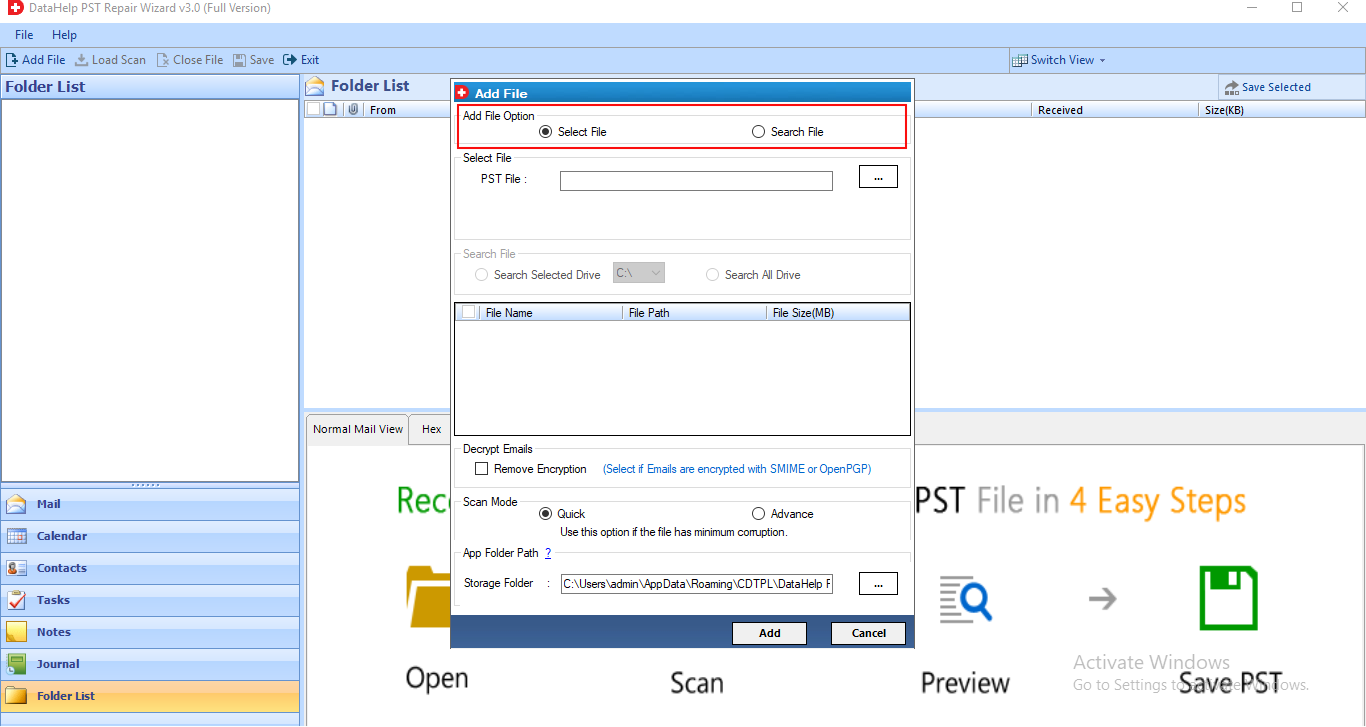
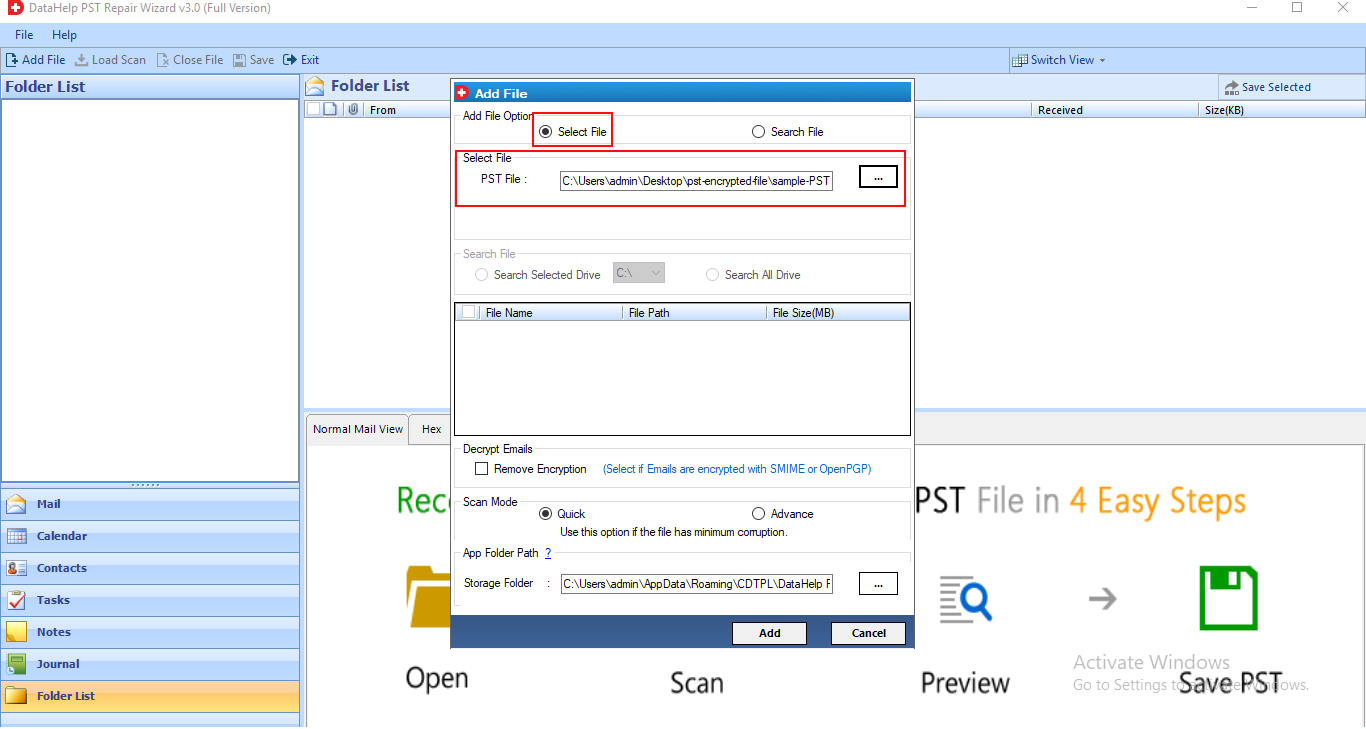
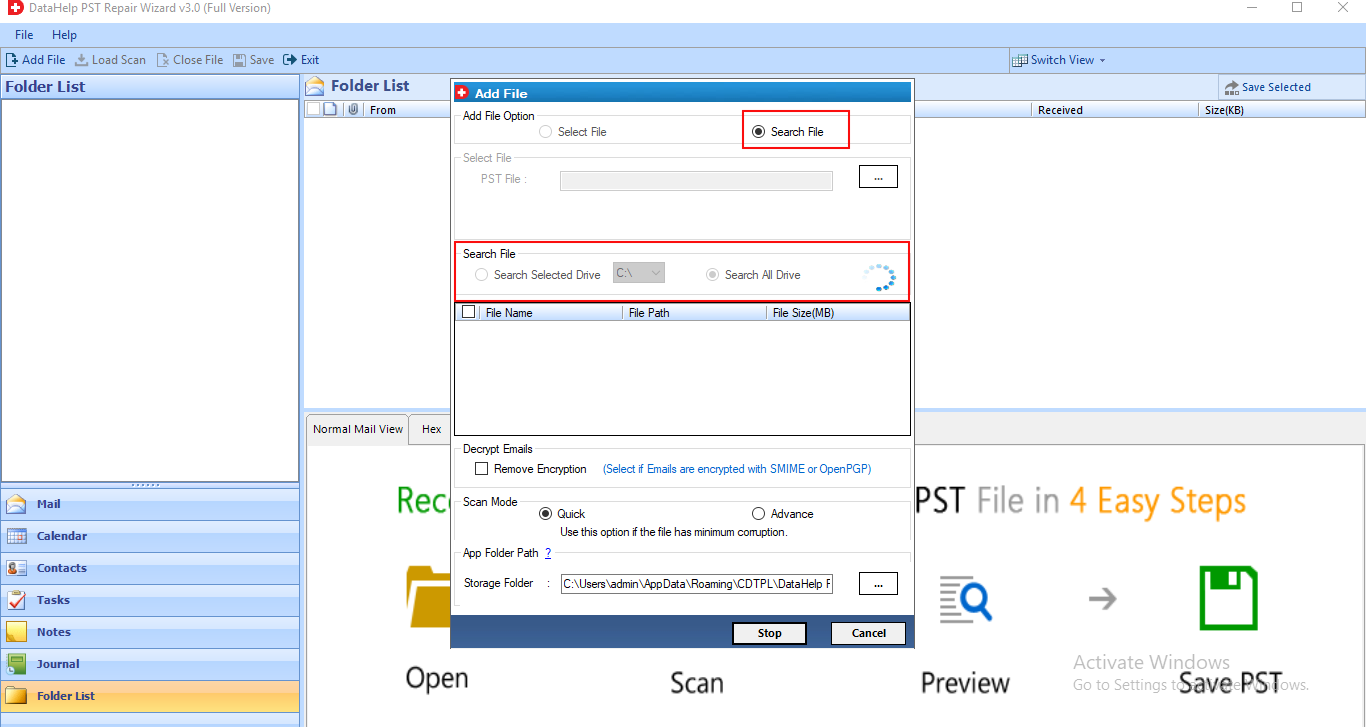
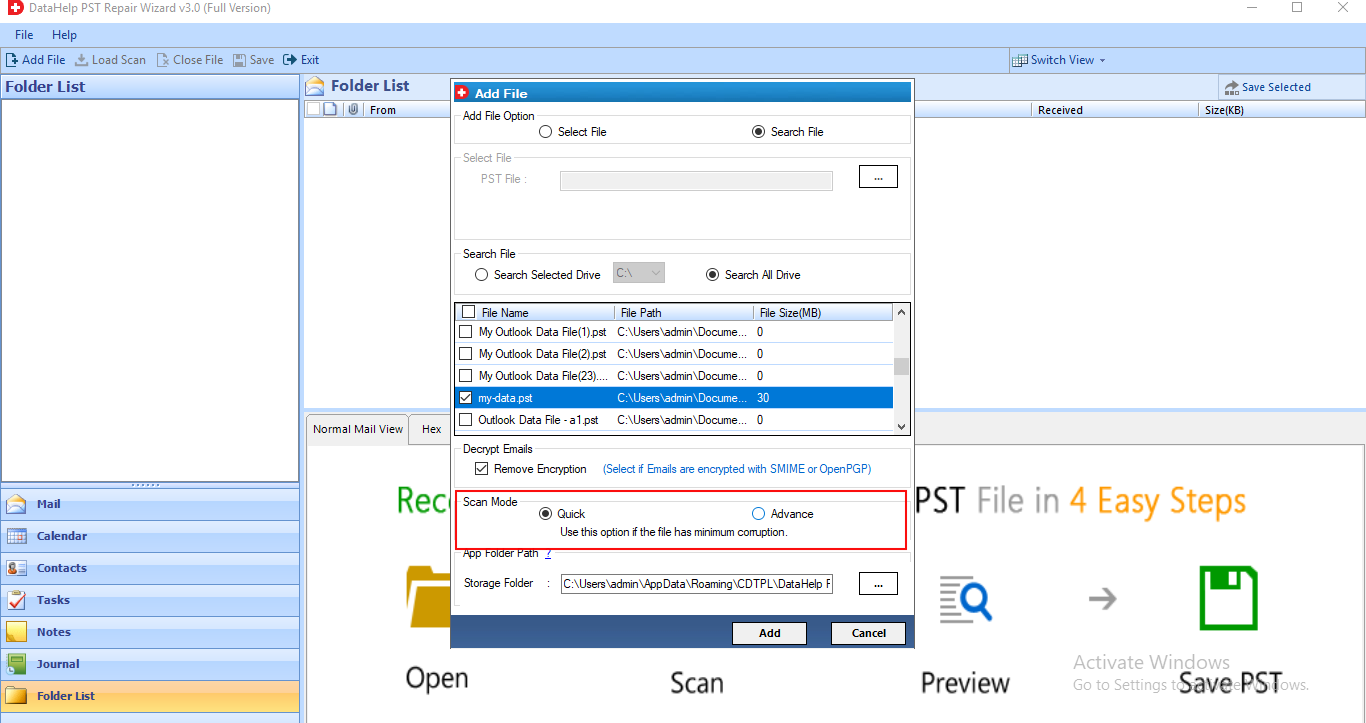
The software to repair PST file provides two different options to add damaged PST files: Select File and Search File. These options can be used to add PST files from any desired system location and search PST within all or selected computer drive. After adding, you can select all the PST files that need to be recovered and the PST repair tool will recover selected files in bulk even without resulting any kind of data loss.
In order to repair minor-level corruption in archive PST or PST files created by scanPST.exe. tbis software provides Quick Scan option. In case of severely corrupted PST files, the software provides Advanced Scanning option. Once PST scanning process gets completed successfully. it loads and previews entire PST items that include Outlook emails, contacts, tasks, notes, and journals.
All the attachments embedded with PST file emails also can be recovered using this tool. It repair PST file attachments & restore in their original file format. All the recovered attachments will be integrated with respective emails. In addition, the software retains the original hierarchy of emails and preview email attachments before reparing PST file. Check this feature in free demo version of the software.
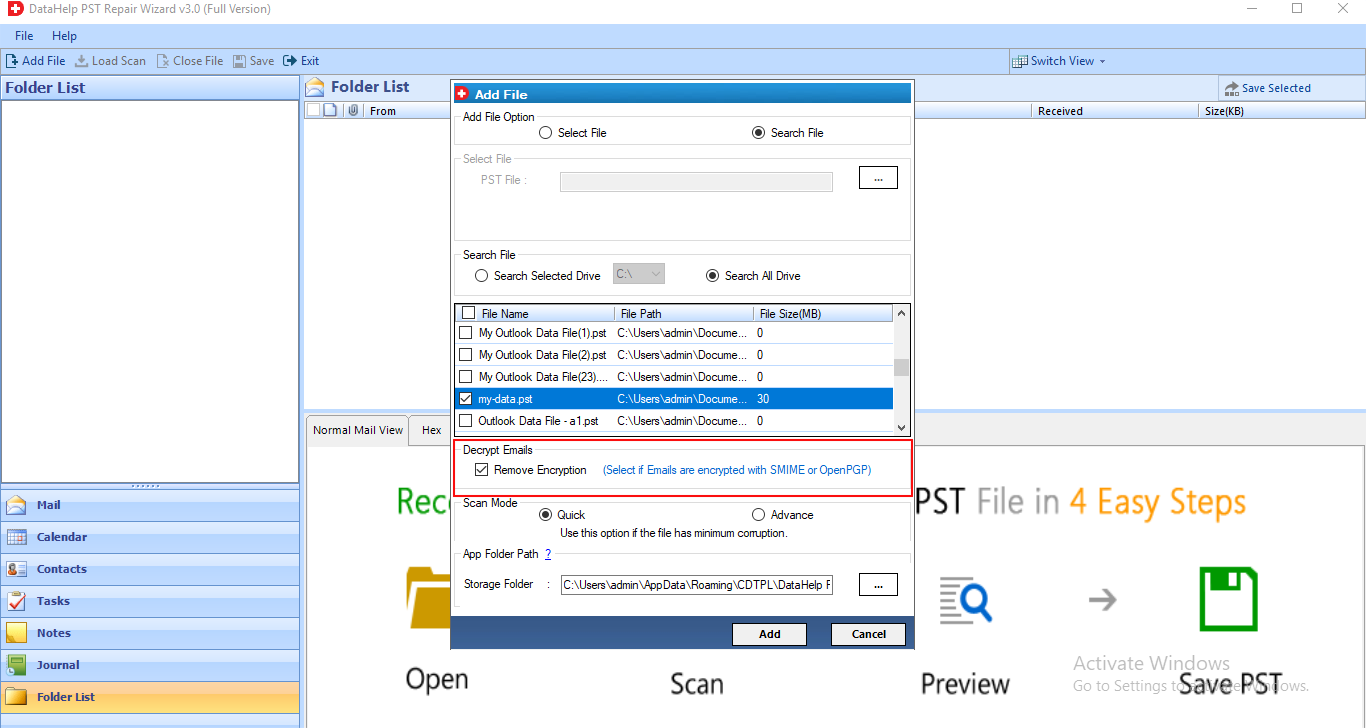
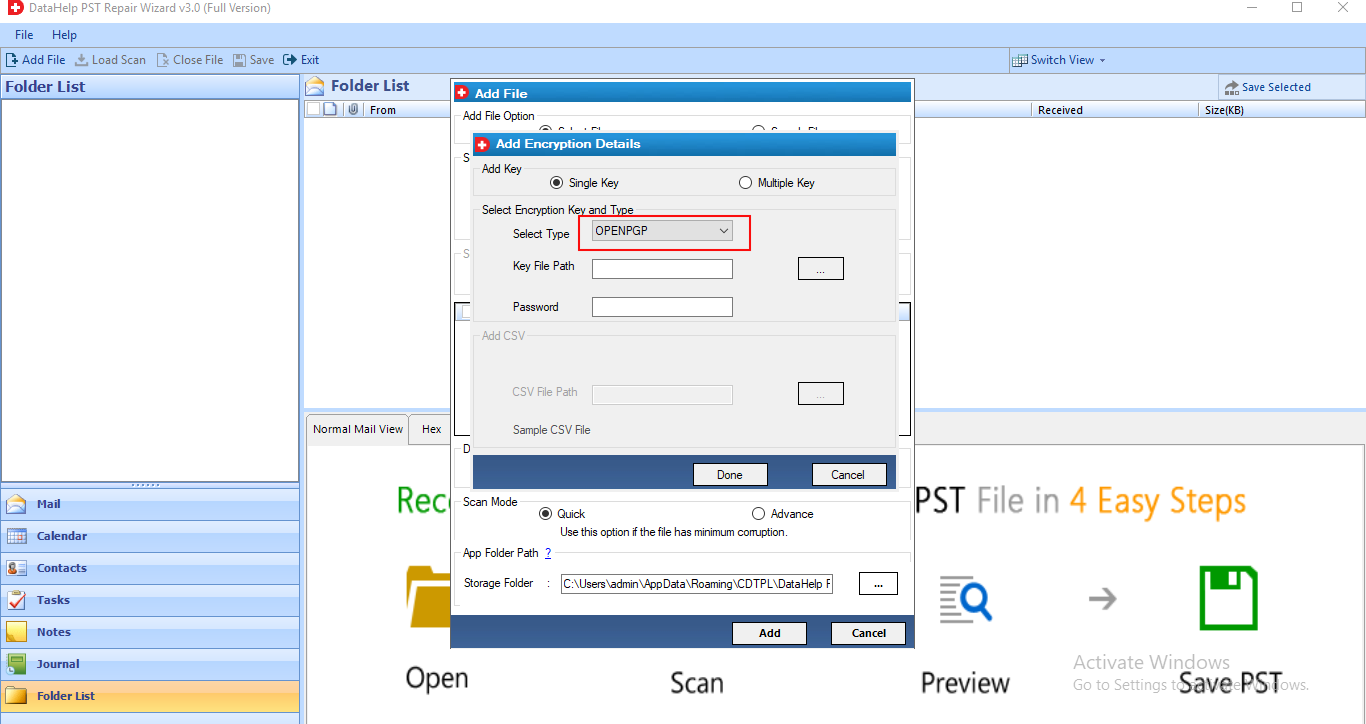
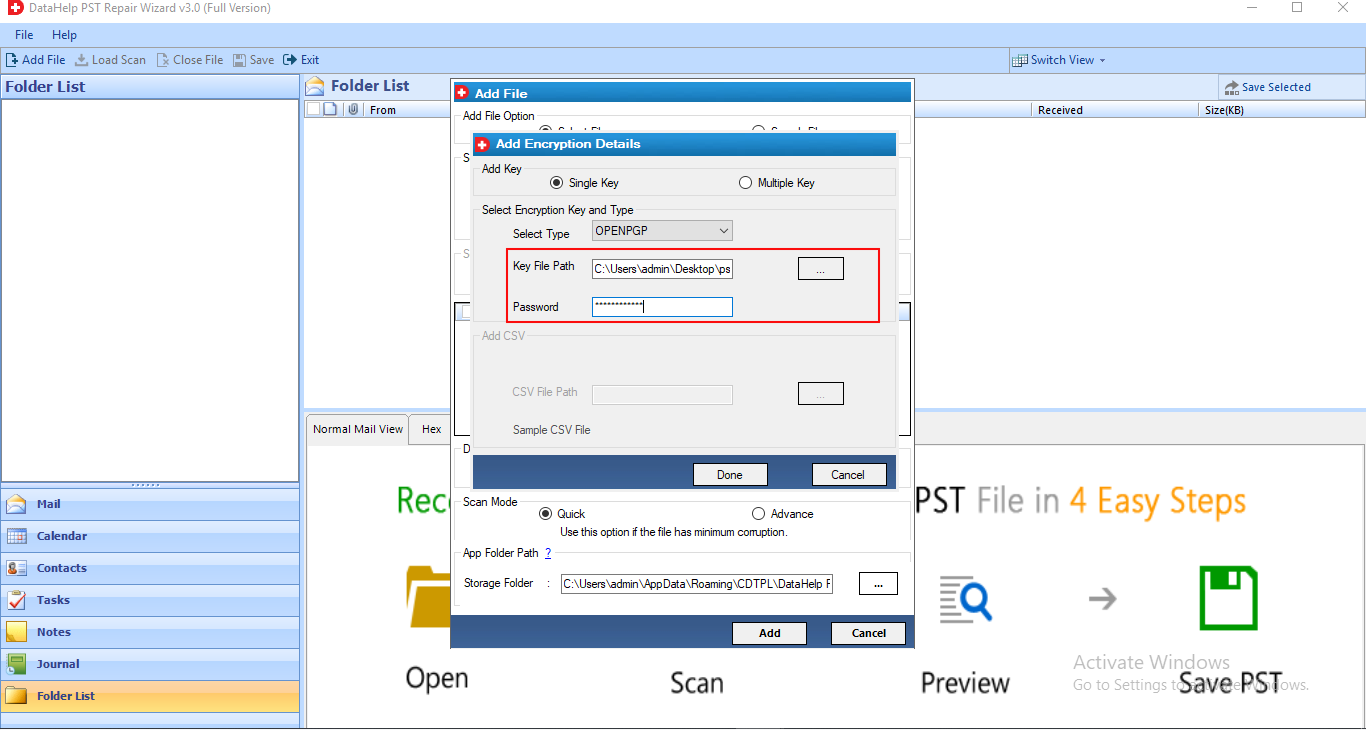
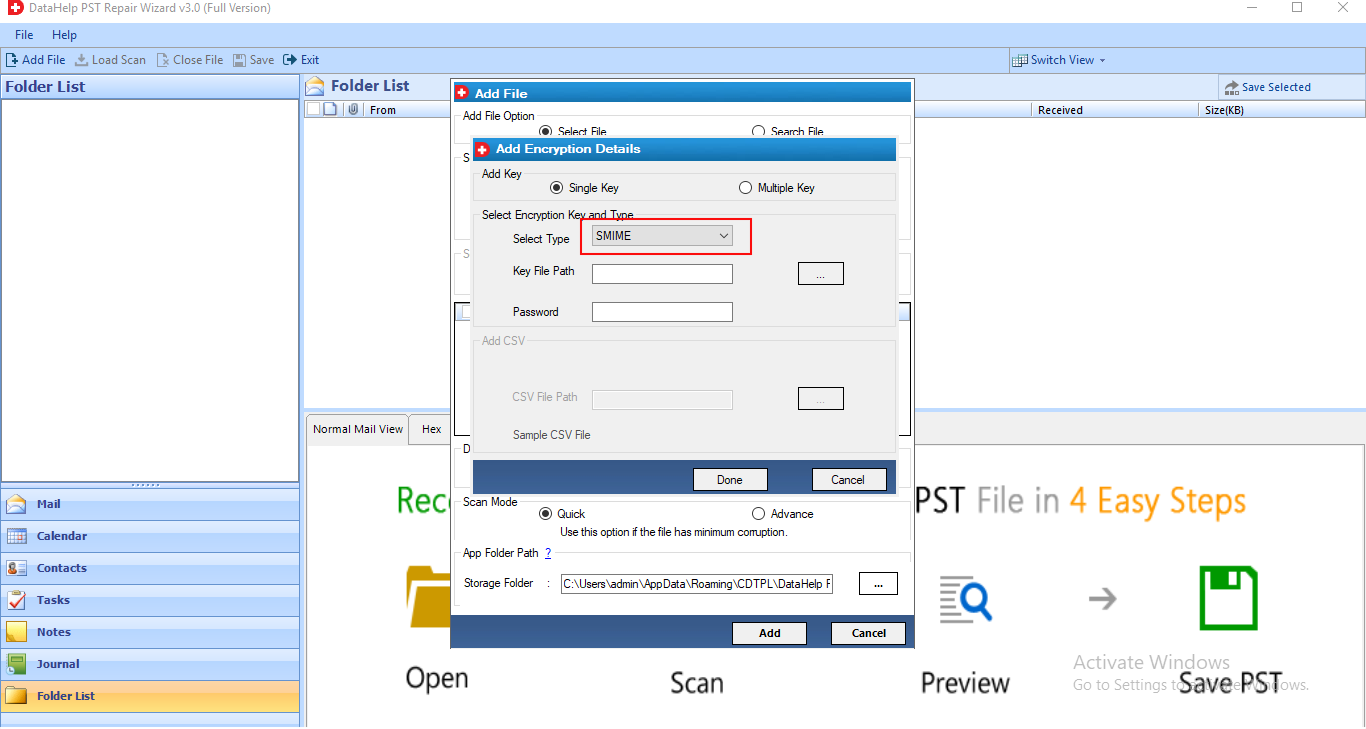
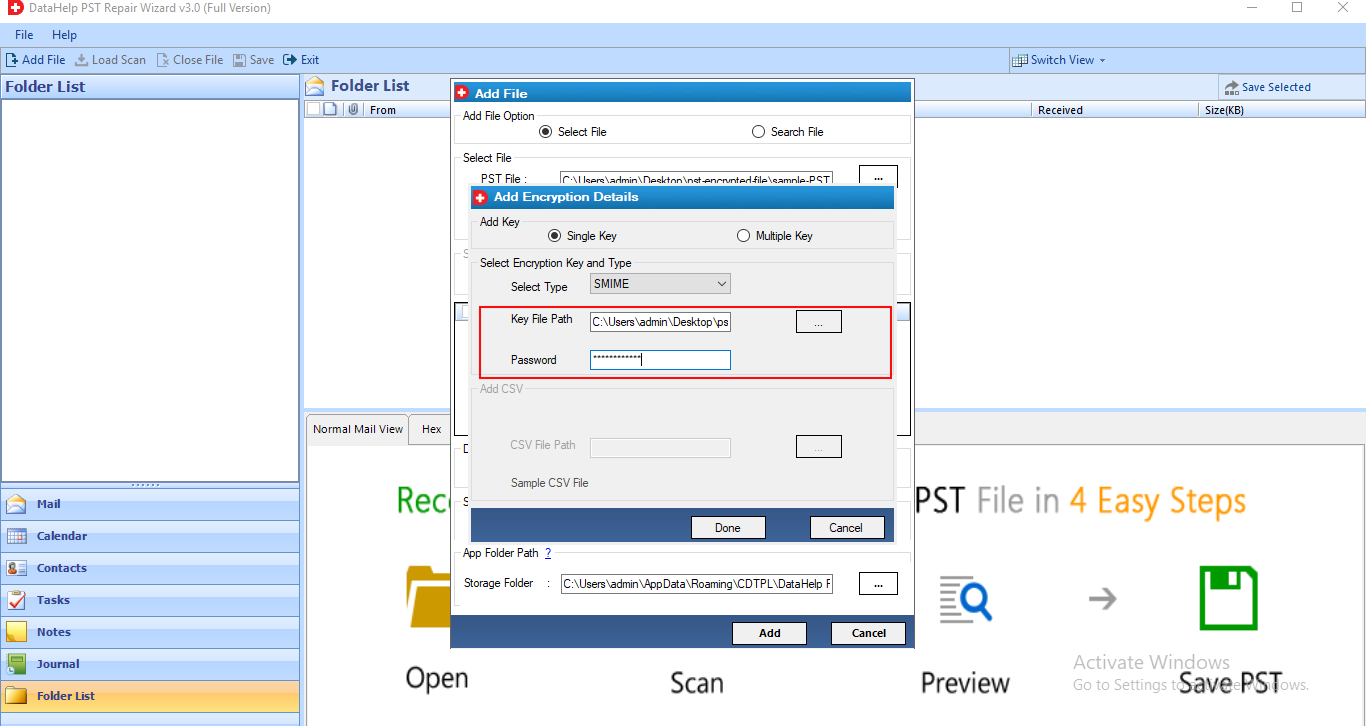
Software is capable enough to decrypt SMIME and OpenPGP encryptions from Outlook PST file. Encrypted PST emails can be decrypted easily with the help of respective keys, certificates, and PST passwords. Despite this, the tool allows to perform decryption of multiple PST emails in bulk and keep attachments integrated after email decryption.
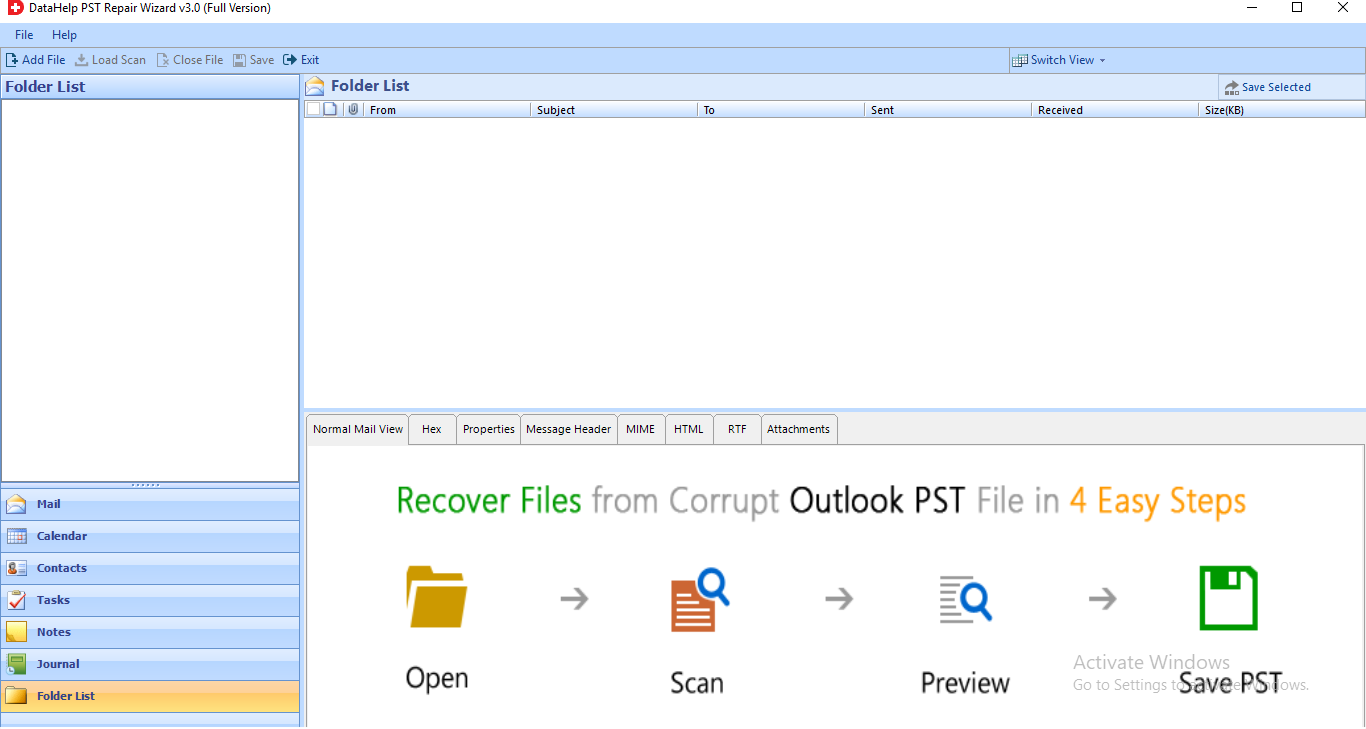
After scanning the browsed PST file, the software will loads the PST and generate a preview of PST items like emails, contacts, tasks, journals, notes, etc. Its in-built file viewer allows to preview PST emails as Normal Mail View, Hex, Properties, Message Header, MIME, HTML, RTF, and attachments. This email preview can be used to analyze the information of PST files. Buy PST repair software full version.
BAK PST files generated by Inbox repair Tool (scanPST.exe utility) also can be recovered using the wizard. The Outlook.bak files can be added directly to the software using the Search File option and in case of unknown location. One can use its Search File option. The BAK file items can be recovered and save as PST / PDF/ EML / MSG / HTML format. To save recovered data buy PST repair tool full version.
Repairs normal as well as highly corrupted PST files. After that save recovered PST files in multiple file formats. It provides multiple naming convention options to save the resultant data files. For example: Subject, Subject+Date(DD-MM-YYYY), From+Subject+Date(YYYY-MM-DD), Date(DD-MM-YYYY)+From+Subject, etc. Check this feature by using free demo version.
Tool is capable to recover corrupted / damaged / unreadable / inaccessible Outlook PST files in a few clicks and keeps the metadata intact. All the basic email attributes such as To, Cc, Bcc, Subject, etc., remains the same even after reparing. Moreover, all Contacts details, Calendars, Tasks, Notes, and Journals can be recovered along with all their metadata properties.
The PST repair software supports to recover lost emails from browsed PST file and holds read and unread status of Outlook emails. In case if someone has accidentally deleted unread Outlook emails along with unnecessary Inbox emails. Then, this option can prove handy. It is so because the software will recover all the deleted PST file emails and in the output the unread / read emails status will be displayed as before. Use PST repair full version to check this feature.
Since Distribution List is a super crucial component for Microsoft Outlook Users and accidentally deleting it is a tragic end. But, with the software, the Outlook Distribution List can be recovered simply. All the members, their contact details, email addresses, etc., can be recovered quickly using this software. The software recovers both normal and permanently deleted Outlook distribution list.
Why Choose DataHelp Outlook PST Repair Software
DataHelp PST Repair Software
Other PST Repair Tools
DataHelp PST Repair Software - Technical Specifications
100% Safe & Secure Download
Resources and guide how to use DataHelp MBOX to PST Converter Software
Reliable Performnces
DataHelp PST Repair Tool efficiently resolves common Outlook errors that are caused by corrupted or inaccessible PST files.
How Use DataHelp PST Repair Software?
DataHelp PST Repair Software – Free vs Full Version
| Feature and Capability | Free Edition | Full Edition |
|---|---|---|
| Add and Scan Corrupt PST Files | ||
| Repair Damaged Outlook PST Files | ||
| Preview Recovered Emails | ||
| Recover Contacts, Calendars and Attachments | ||
| Maintain Folder Hierarchy | ||
| Export Repaired PST File | 25 Items | Full Recovery |
| Supports All Outlook Versions | ||
| Cost | Free | $499 |
| Buy Links | Download Now | Buy Now |
How Data Help Outlook PST Repair Works?
01
Add PST Files
Browse and add the corrupted or damaged Outlook PST file into the PST Repair software.
02
Scan Corrupt PST
The tool scans your PST file and detects errors, corruption and recoverable mailbox items.
03
Preview Data
You can preview all recovered Outlook emails, contacts, calendars and attachments before saving them.
04
Save Repaired PST
Export recovered mailbox data into a new healthy PST file compatible with Microsoft Outlook.
Trusted by Professionals Worldwide
DataHelp Software is Trusted Worldwide for Secure and Reliable PST File Repair
Customer Reviews
Explore Our Client’s Success Stories
Reliable Email Migration
I have been using DataHelp Software tools for email migration and recovery for quite some time and yes the software works smoothly and converts my mailbox data accurately without losing attachments or folder structure. Furthermore their support team responded quickly and guided me through the process. This saved my lot of time during my email migration projects. Overall I am very much happy with the reliability of their tools.
Michael Carter
Excellent Outlook Data Recovery
I had a serious problem with a corrupt Outlook PST file and couldn't access my emails and after trying different solutions I finally used DataHelp Software which recovered my mailbox data easily. The tool was easy to use and the preview feature helped me verify my emails before saving them. Their support team was also very helpful and responded quickly.
Daniel Roberts
Fast and Helpful Support
DataHelp Software provided a smooth experience while I was handling my Outlook data recovery issue. The tool worked perfectly and their support team also very helpful in all the ways.
Andrew Collins
Trusted and Reliable
I have used several DataHelp tools for email conversion and migration tasks and based on my experience using this tool I can say the software is reliable, easy to use and performs conversions accurately without losing mailbox data. - James Walker
Krisha Viswanat
Reliable Data Recovery
DataHelp Software helped me to recover important my Outlook emails from a damaged PST file. My experience using the tools is awesome as the tool was simple, fast and restored my mailbox data accurately.
Thomas Miller
![]()
![]()
Frequently Asked Questions
4 Steps to Repair Corrupt PST File:
Well, you can use PST Repair Software to find out your corrupted PST files in the computer. It doesn’t matter if you forgot the location as this tool provides Search File option to auto-detect the location of PST files from one of all system drives.
The PST repair tool can help you to recover emails from corrupted UNICODE PST files. Moreover, the software supports to recover all the PST files created by any version of Outlook like 2019, 2016, 2013, 2010, 2007, 2003, 2002, and 2000.
The wizard is a standalone utility that can help you to recover your permanently deleted Outlook PST file emails, contacts, calendars & other items. After performing deleted emails recovery Outlook PST data file, the permanently deleted emails will be highlighted in red color so that you can identify them easily.
PST repair tool allows to recover emails, contacts, calendars, journals, tasks, and other PST file items from both OpenPGP and SMIME encrypted PST emails. You just need to enter the respective key and certificates then, leave all on the software.
Of course, Yes this software allows to recover and restore corrupted, deleted desired data items from browsed PST file. You can select desired data items only like emails, contacts, calendars, etc., while exporting. With this tool you can easily repair corrupted PST file of 2016, 2013, 2010, 2007, 2003, 2002, 2000 with entire items.